Short Information about OpenTodoList
Image source: Pixabay

Stay Organized

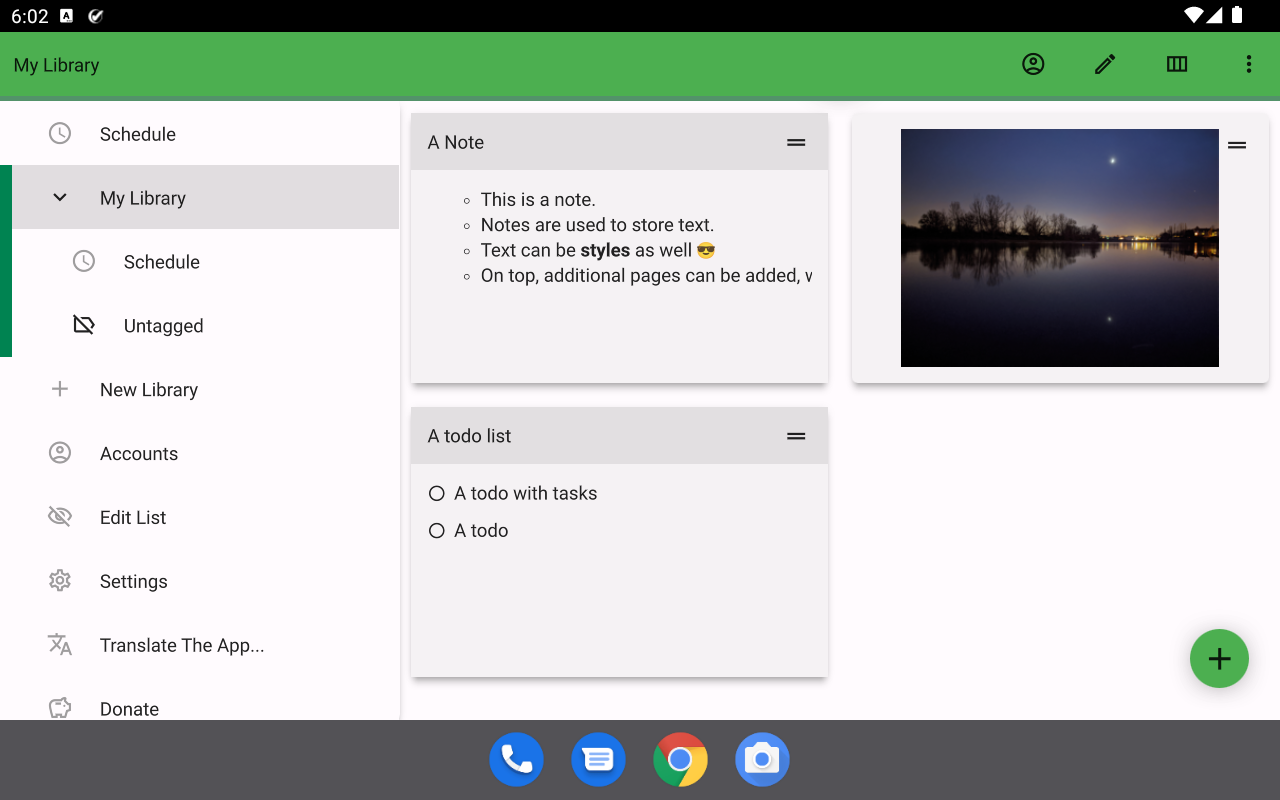
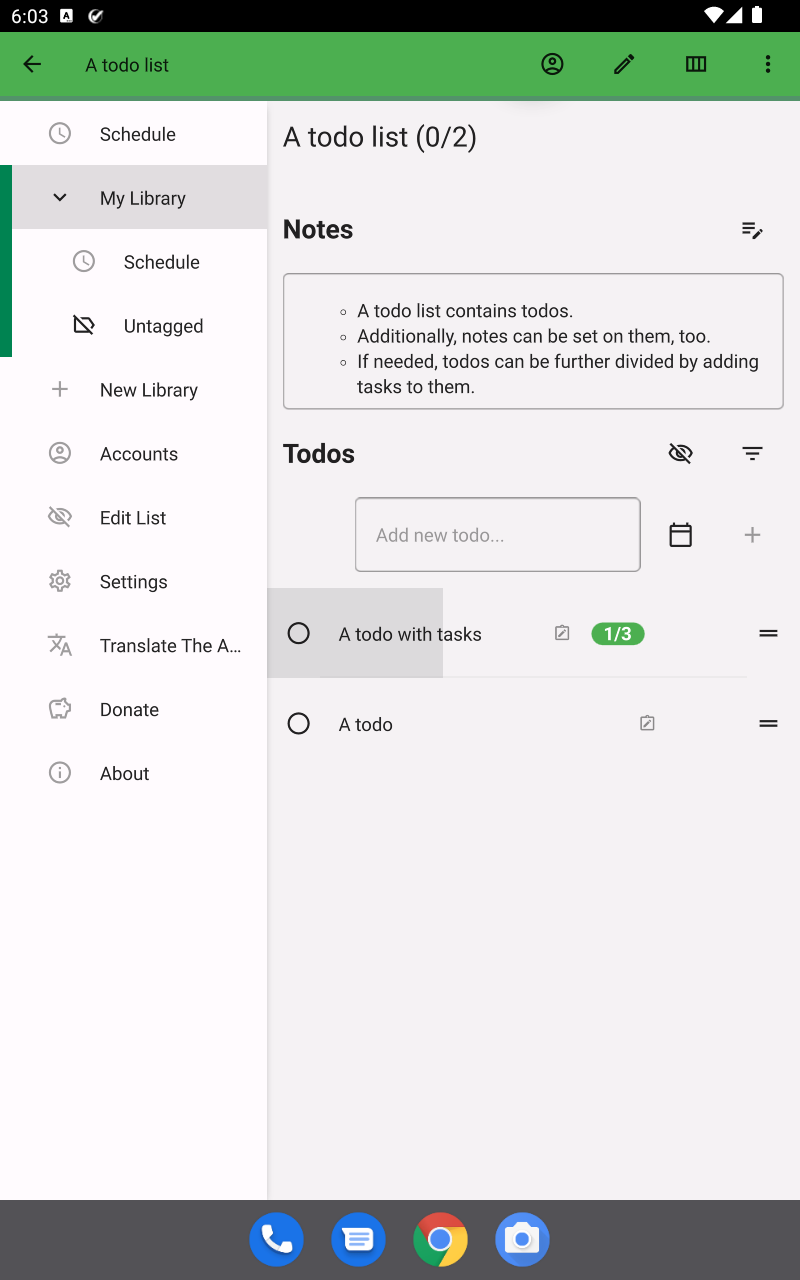
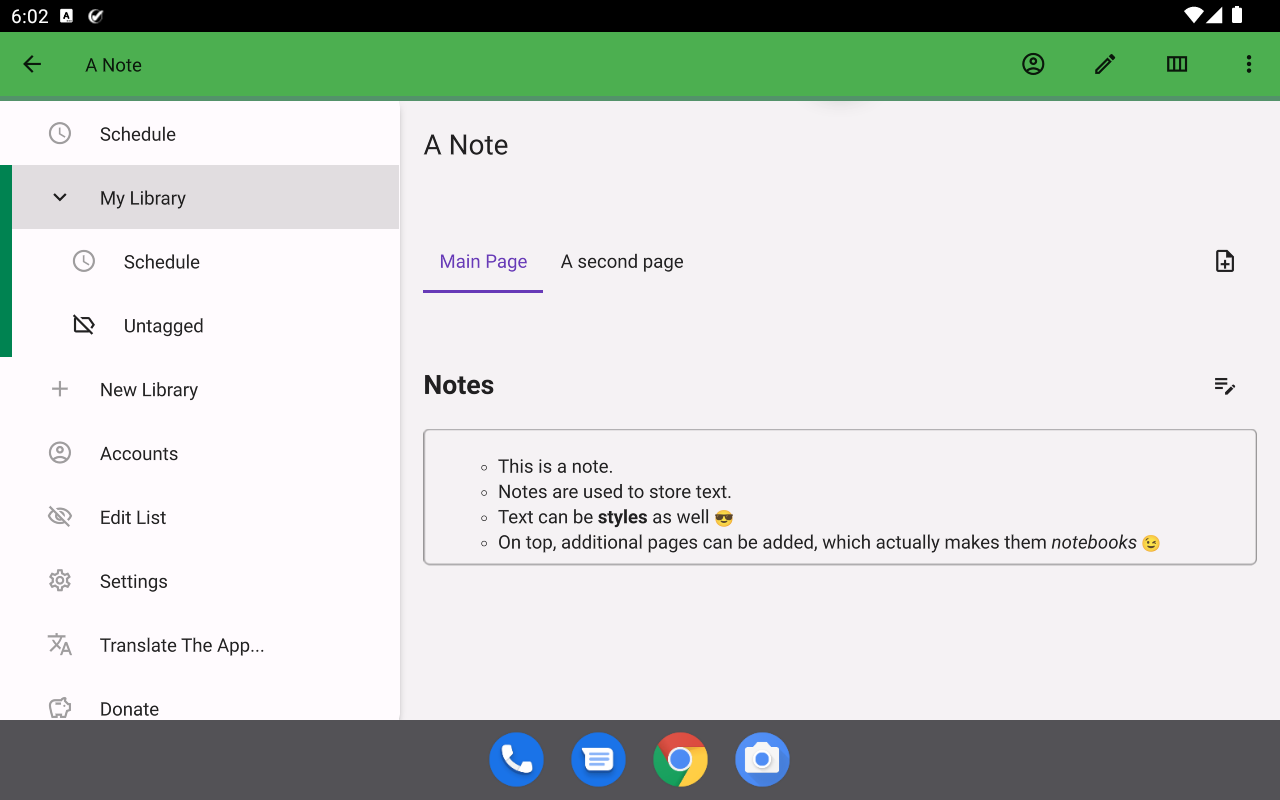
Organize todo lists, notes and images in libraries. Create e.g. a library for personal use and one for work. In addition, you can tag items inside a library, which allow you to easily break down larger collections into smaller parts.

Sync Your Data With NextCloud, ownCloud and More

OpenTodoList allows you to synchronize your libraries with NextCloud, ownCloud and other WebDAV enabled web storage servers. Additionally, you can also use Dropbox for synchronization. And on top, as libraries are basically just a set of folders and files, you can use any third party synchronization tool of your choice.

Your Data is Yours

We do not restrict the cloud platforms your can use to synchronize data. We have support for some platforms like NextCloud or ownCloud, which you can easily host yourself on your own or trusted hardware. In addition, you can opt to create libraries just locally e.g. on your laptop - there’s no better way to prevent confidential information to leak.

For Desktops and Mobiles

OpenTodoList is designed to run on both Desktop Operating Systems like Linux, macOS and Windows as well as mobile ones like Android.

Hey everyone!

After the last release mostly focused on getting the technical foundation of the app back into shape, this one brings a new feature that you can actually see and use: Recipes!

Besides that, there are quite a few fixes and improvements around syncing and packaging the app. So, without further ado, let’s have a look at what changed.

Changelog

rpdev/opentodolist#588: Support For Recipes

OpenTodoList started as an app for notes and todo lists, but over time it grew into a place where you can keep quite a lot of structured information. With this release, recipes become a first class citizen as well.

You can now create recipes inside a library, add ingredients, group them with headings, track utilities you need for preparing the recipe and write down the individual preparation steps. Recipes can also store a yield, so you can note whether something makes e.g. 4 servings or 12 pieces.

As with the other item types, recipes live inside your libraries and therefore benefit from the existing sync support. So if you use OpenTodoList on multiple devices, your recipes can travel along with the rest of your data.

This is the first version of the feature, so expect it to grow over time. But the basics are now there - time to collect some favorite meals!

The app now allows you to store recipes.

rpdev/opentodolist#695: More Robust WebDAV Synchronization

This release also contains a fix for WebDAV synchronization. Some servers can occasionally respond with temporary errors - for example because of a short network hiccup or because the server is briefly unavailable.

OpenTodoList now handles such transient errors more gracefully by retrying the operation, which should make synchronization via WebDAV, including providers like Strato/HiDrive, more reliable.

rpdev/opentodolist#696: Smaller Android APKs

The Android package grew quite a bit after the recent Qt updates. This release changes the packaging of native libraries on Android so that the Qt libraries can be compressed again.

In short: The APK download should be smaller again. Always nice when an update is a little lighter on your bandwidth.

rpdev/opentodolist#698: More Reliable Windows Builds

The Windows build sometimes failed because dependencies were missing or the build environment was not quite in the expected state. The CI setup now uses a Windows Docker image for building the app, which should make these builds more stable and also speed them up.

This is not something you will notice directly in the app, but it helps a lot to get releases out more reliably.

rpdev/opentodolist#699: Bring Back macOS and iOS Shared Runner Builds

The macOS and iOS builds are back on GitLab’s shared macOS runners. There were quite a few changes needed here: updated runner images, fixed signing setup, proper import of Apple certificates, provisioning profile handling and better diagnostics around the installed Qt tools.

Again, this is mostly release infrastructure work. But especially for macOS and iOS, being able to build and sign the app reliably is a big part of keeping the project healthy.

rpdev/opentodolist#691: Fix Automatic Release To The Play Store

The automatic upload of Android builds to Google Play was broken. This release fixes that pipeline and adjusts the upload step to only send the app bundle, without trying to update store metadata, images or changelogs from CI.

Other Changes

There are a couple of smaller changes as well:

  • Translations were updated from POEditor.
  • A test failure caused by localized JSON parser error messages was fixed.
  • The QML code was split into dedicated modules, which should make the code base easier to work with and help development tools understand the project better.
  • Some UI internals around dialogs, markdown editing and recipe editing were cleaned up along the way.
  • You can now add image links to images attached to an item to render them when we display the item’s notes.

Downloads

  • Please find the download links for major platforms on GitHub.
  • For Android, the release is available via Google Play.
  • For iOS, the release is available via the App Store.
  • If you use snap, you can install the app from the snapcraft.io.
  • If you use flatpak, you can install the app from Flathub.
  • For Arch based Linux distributions, you can install the app from AUR.

Known Issues

There is a minor known regression with the Qt6 based build of the app when running on Linux with Wayland. Reordering items via drag and drop works, but you sometimes have to click somewhere (e.g. the tool bar) to re-enable hover for the items after such a drag and drop operation. This has been reported as a bug against Qt in their bugtracker. Usually, you can start the app passing it the -platform xcb option to force using X11/XWayland (which does not show the same symptoms).

Hey everyone!

After just a few days, here’s another small update of OpenTodoList. Basically, it fixes just a single thing 😉

Changelog

rpdev/opentodolist#692: Bring Back Translations

Late in the development of the last version, a little bug sneaked in that prevented the translations that are stored within the app for several languages to be actually loadable. Long story short: This is fixed in this release, so if you prefer the app to show up in your local language - you’ll get it!

Downloads

  • Please find the download links for major platforms on GitHub.
  • For Android, the release is available via Google Play.
  • For iOS, the release is available via the App Store.
  • If you use snap, you can install the app from the snapcraft.io.
  • If you use flatpak, you can install the app from Flathub.
  • For Arch based Linux distributions, you can install the app from AUR.

Known Issues

There is a minor known regression with the Qt6 based build of the app when running on Linux with Wayland. Reordering items via drag and drop works, but you sometimes have to click somewhere (e.g. the tool bar) to re-enable hover for the items after such a drag and drop operation. This has been reported as a bug against Qt in their bugtracker. Usually, you can start the app passing it the -platform xcb option to force using X11/XWayland (which does not show the same symptoms).

Hello hello!

It has been a quite long time of silence and some of you might already got nervous if there would be further releases of OpenTodoList. Well, rest assured, there will be more. And we start with a big one - at least from a developer’s point of view. 🧑‍💻

Yes, you might not find too many interesting changes in this release that really show up at the surface. However, under the hood a lot has changed and this will make it way easier bringing forth future releases. But before we start with the usual changelog, some organizational announcement.

New Release Process

In the past, I tried to release the app about every 3 months. For a long time this worked quite well. However, the last year showed that this schedule is currently unrealistic:

Personally, I had a lot of stress in my professional life. On top, I was longer on sick leave. All together, while I always found a bit of time for hacking, fulfilling the (too big) plans I made for the individual releases never worked out and I kept postponing this release for months.

Instead of a fixed, 3 months schedule, I will change to a release on demand scheme. Whenever something worth releasing accumulated, there will be a new version. The other side of the medal: If - like with this release - something bigger needs to be done that I cannot fit into a 3 month period, there might be a longer pause between releases again. No matter what, though, I stay committed to release regularly and especially keep the app alive. Especially on Android and iOS, regular releases might happen to ensure the app still can be installed on new devices and keeps up with latest developments on these platforms.

Now, with this being said, let’s check out what 3.50 actually includes!

Changelog

Refactoring, Refactoring, Refactoring!

I know I mentioned this in the past already, but one more time: OpenTodoList is already quite old (in terms of software). The first release happened already in 2013!

A lot has changed since then. Initially, the app was written on top of the Qt 5 framework, using Qt’s own qmake build tool. Nowadays, we are on Qt 6 and since long changed to the semi industry standard CMake tool for building the app.

Why am I mentioning that? Well, a lot has changed and Qt’s CMake APIs have evolved dramatically. On the other side, the way the app was using CMake to build was really dated. This release sees a lot of updated on that front, bringing the build to an up to date state. And this pays out:

Not only should this make future development easier and even help improve the performance of the app at runtime. It is now also easily possible using e.g. Visual Studio Code for developing the app! Why is this important? Well, QtCreator - Qt’s in house IDE - isn’t bad. But VSCode has some power features that really help boost development - most notably integration of AI features.

Another important improvement is, that this allows easier integration of additional tools like qmllint, a tool to automatically check the files we use for describing the user interface, for issues and potential improvements.

Lastly, in that go, the app was also updated to the latest Qt 6.10 release - which is important to still be able to release the app on mobile systems and - as always - makes some nice new features available.

So the bottom line here is: While this whole migration took quite a while, it was really worth it and should help speeding up future development!

Fastlane Configuration For Releasing To F-Droid

Thanks to @IzzySoft, there’s now an initial structure for Fastlane that - in the future - will help to release the app to the IzzyOnDroid F-Droid repository. Thanks for the contribution!

Document Drag&Drop Workaround on Wayland

Thanks to another user, @eggia3, we now have a proper documentation of a Drag&Drop issue when using the app on Wayland. Also, big thanks here for the contribution!

rpdev/opentodolist#681: Fix Disabling Of Certificate Checks

This release also contains some fixes. One important one: Certificate checks (when using WebDAV, NextCloud and ownCloud) can not be properly turned off. This is usually only interesting if you want to test a new instance or cannot - for some reason - use a proper SSL certificate for a custom server.

rpdev/opentodolist#678: Fix “Save Notes” Button

Another fix: When editing the notes of an item, the “Save Notes” button is not finally functional again!

Last but not least, this release fixes the links to imaged in the README.md file. As this file is the main entry point for someone visiting the app on GitLab or GitHub, this is quite important - you know, first looks 😉

Downloads

  • Please find the download links for major platforms on GitHub.
  • For Android, the release is available via Google Play.
  • For iOS, the release is available via the App Store.
  • If you use snap, you can install the app from the snapcraft.io.
  • If you use flatpak, you can install the app from Flathub.
  • For Arch based Linux distributions, you can install the app from AUR.

Known Issues

There is a minor known regression with the Qt6 based build of the app when running on Linux with Wayland. Reordering items via drag and drop works, but you sometimes have to click somewhere (e.g. the tool bar) to re-enable hover for the items after such a drag and drop operation. This has been reported as a bug against Qt in their bugtracker. Usually, you can start the app passing it the -platform xcb option to force using X11/XWayland (which does not show the same symptoms).

Hey everyone,

First of all: A Happy New Year! We are already a bit into 2025, so about time to release a new version of OpenTodoList, right? Without further ado, here is what’s new in this release:

Changelog

rpdev/opentodolist#674: Update to Qt 6.8

If you follow along the release notes regularly, you know that song: We updated the app to use version 6.8 of the Qt framework - the fundamental layer on which OpenTodoList is built on. And as alway, this pulls in upstream fixes and makes new features of the framework available for use in future versions of the app.

rpdev/opentodolist#611: Make primary and secondary UI colors configurable

Green has been OpenTodoList’s color since ever. But… maybe you’d rather use something else for the app? Good news: With this release, you can customize the primary and secondary color of the app 🎨

rpdev/opentodolist#650: Fix translations in the UI (everywhere, finally)

Another noteworthy change: The translations of text in the app to your local language now should consistently work! 🎉

We identified a bug which caused a subset of the translated strings not to land in the app - that’s now finally over.

rpdev/opentodolist#606: Allow moving tasks

Another neat new feature: You can now move a task (i.e. a sub-entry within a Todo) to another todo.

rpdev/opentodolist#669: Fix the user documentation build

Documentation is important. We kicked off an initial version of a user centric documentation for the app in the previous releases. However, the build of the documentation got broken - this is fixed so updates should hit the server again 😉

rpdev/opentodolist#668: Use upstream snapcraft image for building the app

On Linux, we provide the app - among others - also as a Snap. In this release, we switched our build to use the upstream Snapcraft image to package the app - this should help keep the builds more stable!

rpdev/opentodolist#663: Add a simple backup solution

Better safe then sorry, right? Sometimes its necessary to back up your data. OpenTodoList supports synced libraries as its main purpose for this - that way, the data is kept in sync with an arbitrary WebDAV server (including NextCloud or ownCloud) or Dropbox. However, even that - sometimes - might not be sufficient.

For this reason, you will now find a Backup option in the file menu. Running this, you will get a zipped up copy of the currently open library, which you can then save to a secure place.

For the time being, this is considered an expert option - you will notice there is no means yet to restore a library (except by manually copying it into the libraries folder of the app). However, we plan to extend on this feature in future iterations, adding such a restore function and maybe even allow snapshotting your libraries automatically from time to time, storing a copy of the library at a particular time on the server.

You can now create backups of individual libraries as zip files.

Downloads

  • Please find the download links for major platforms on GitHub.
  • For Android, the release is available via Google Play.
  • For iOS, the release is available via the App Store.
  • If you use snap, you can install the app from the snapcraft.io.
  • If you use flatpak, you can install the app from Flathub.
  • For Arch based Linux distributions, you can install the app from AUR.

Known Issues

There is a minor known regression with the Qt6 based build of the app when running on Linux with Wayland. Reordering items via drag and drop works, but you sometimes have to click somewhere (e.g. the tool bar) to re-enable hover for the items after such a drag and drop operation. This has been reported as a bug against Qt in their bugtracker. Usually, you can start the app passing it the -platform xcb option to force using X11/XWayland (which does not show the same symptoms).

Hi everyone out there!

You already might have started wondering: When is the next release of OpenTodoList coming? Did something happen? Has the app been abandoned? 😱

Rest assured: Nothing like that happened!

We had a quite busy year to date and only recently found some time resuming work on OpenTodoList. That also means that - despite the long time since the last release - the list of changes it not too long. However, there are some existing changes, so, let’s waste no more time and dive into what changed:

Changelog

rpdev/opentodolist#661: A new color scheme and theme!

This surely is the most exciting change in this release! We decided to tune the appearance of the app, switching away from the Material design and started an own one, which is based on Qt’s Basic theme.

This new scheme way more lightweight compared to Material - which should benefit a lot situations where the app runs on lower end hardware. In addition, we updated the color scheme - the app now uses more vibrant colors both in light and dark modes.

Another interesting change is how the color of individual items affect the app. In previous releases, we used to use the color to tint the background color of pages when opening items. However, this often looked a bit odd and kind of washed out. With the new theme, we now use the item colors to render controls and links in the item’s page.

Surely, this is only the beginning and subsequent releases will bring updates and improvements to the new style. We still hope you like it already 😉

The new color scheme uses more vibrant colors - both in light and dark modes.

rpdev/opentodolist#654: Brand colors for Flathub

It is possible to set brand colors in the app metadata file (which is used e.g. on Flathub but also in some app store implementations of Linux distributions).

We now also make use of this feature and set the new background theme colors we also use in the app itself.

rpdev/opentodolist#658: Update to Qt 6.7.2

Ever so often, there are updates to Qt - the framework on which OpenTodoList is built. This framework is the key that allows us providing the app on a variety of operating systems and devices.

With this release, we update to Qt 6.7.2 - as always, this brings bug fixes but also makes new features available, what we’ll use to further improve the app.

rpdev/opentodolist#652: Fixes to popups when using large font size/small devices

When using a custom (enlarged) font size or using the app on a relatively small device, it could happen that some of the popups where rendered incorrectly.

We changes this in this release, so popups should look good (and more importantly: Be usable) on any device.

rpdev/opentodolist#660: Fix automatic downloading translations from POEditor

Another issue solved in this release: The automatic downloading of translations from POEditor!

We now use POEditor for quite a while to allow users contributing to the app by providing translations of strings in the user interface to their respective languages. For this, we have some integrations that automatically download the translations so they get automatically included in new builds and releases of the app.

Unfortunately, there was an issue (or let’s rather call it: bit rot) in this scripting, that needed our attention 👨‍⚕️

rpdev/opentodolist#650: Update translations

Having that said, this updated scripting solved a bug report where a user rightfully complained about the missing translations in the app.

Sorry that it took us so long, but: Translations now should be back!

rpdev/opentodolist#379: Start writing the user documentation

Another exciting change, although it just is the beginning of something great:

We started writing some user documentation for the app! 🎉

Might sound boring at first, but keep in mind: OpenTodoList is relatively old meanwhile - meaning it had more than enough time accumulating a lot of different features 😉 While some of them might be easy to use, others are not - so some written down manuals on how to use them would be handy.

We started writing such documentation - it is available on ReadTheDocs.

Note that the documentation is still in a very early stage and we need to add lots of information there. However, the basics and especially the automation for building and publishing it is there.

Feel free to check what is already there and - more importantly - if you have anything in mind that you think should be documentation: Approach us, drop us a ticket or even feel free to raise a PR on GitLab!

Downloads

  • Please find the download links for major platforms on GitHub.
  • For Android, the release is available via Google Play.
  • For iOS, the release is available via the App Store.
  • If you use snap, you can install the app from the snapcraft.io.
  • If you use flatpak, you can install the app from Flathub.
  • For Arch based Linux distributions, you can install the app from AUR.

Known Issues

There is a minor known regression with the Qt6 based build of the app when running on Linux with Wayland. Reordering items via drag and drop works, but you sometimes have to click somewhere (e.g. the tool bar) to re-enable hover for the items after such a drag and drop operation. This has been reported as a bug against Qt in their bugtracker. Usually, you can start the app passing it the -platform xcb option to force using X11/XWayland (which does not show the same symptoms).